


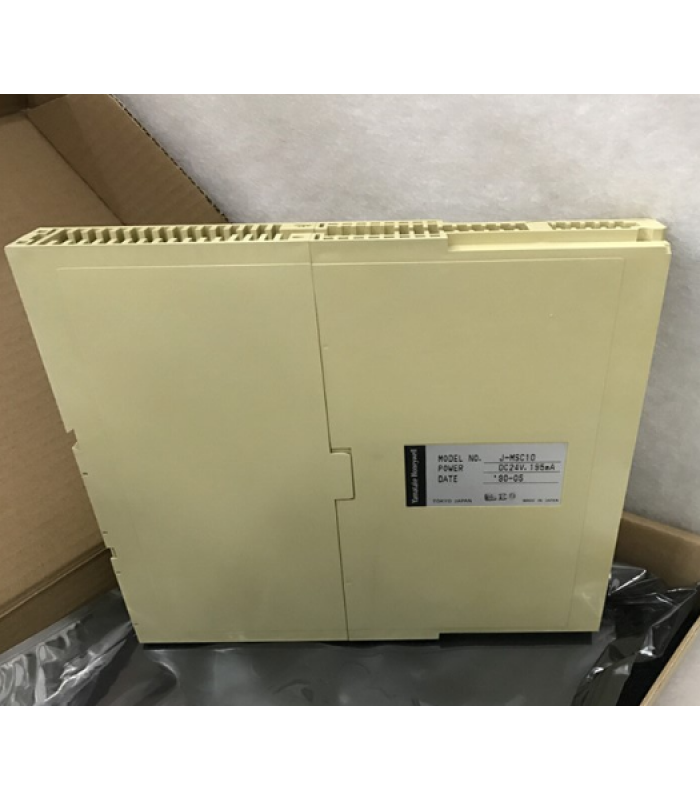
Honeywell FF-SB12R04K-S2 Fieldbus Module
- Product Code: FF-SB12R04K-S2
- Availability: In Stock
Honeywell FF-SB12R04K-S2 Fieldbus Module
Technical Documentation
1. Overview
The Honeywell FF-SB12R04K-S2 is a high-performance fieldbus module designed for industrial automation applications. It provides reliable communication and control capabilities in various industrial settings including manufacturing, energy, and building management systems.
This module features a robust design with 12-channel redundancy architecture and SIL3 certification, ensuring failsafe operation in harsh industrial environments. Its compact design integrates seamlessly with Honeywell Experion® PKS systems and other Foundation Fieldbus compatible systems.
With its versatile communication interface, the FF-SB12R04K-S2 facilitates seamless data exchange between various components within an automation network, enhancing efficiency and reliability in industrial operations.
2. Specifications
| Parameter | Value |
|---|---|
| Model Number | FF-SB12R04K-S2 |
| Product Type | Industrial Fieldbus Module |
| Operating Voltage | 24 V DC ± 10% |
| Input Voltage Range | 9 VDC to 32 VDC |
| Output Voltage | 12 V DC |
| Current Rating | Up to 12 A |
| Contact Rating | 5 A @ 250 VAC |
| Isolation Voltage | 1500 V RMS |
| Parameter | Value |
|---|---|
| Communication Protocol | Foundation Fieldbus (FF) |
| Number of Channels | 4 |
| Signal Type | Analog |
| Operating Temperature Range | -40°C to +85°C |
| Humidity Range | 0% to 95%, non-condensing |
| Environmental Protection Rating | IP67 |
| Dimensions | 120 mm x 80 mm x 40 mm |
| Weight | 0.5 kg |
| Certifications | CE, UL, ATEX, SIL3 |
3. System Architecture
The Honeywell FF-SB12R04K-S2 fieldbus module utilizes a modular architecture designed for flexibility and performance in industrial automation systems. The system consists of several key components working together to provide reliable communication and control capabilities.
The main circuit board contains a microcontroller that serves as the core of the system, executing communication protocols and managing data flow between field devices and the control system. The module includes power management circuits to regulate and distribute power to internal components.
The communication interface circuit handles data exchange using the Foundation Fieldbus protocol, enabling seamless integration with other fieldbus-compatible devices. Signal conditioning circuits ensure accurate processing of analog input/output signals.
The module's robust metal casing provides protection against environmental factors, while heat dissipation fins ensure proper thermal management during operation.
4. Installation Guide
4.1 Safety Precautions
- Ensure the power is disconnected before beginning installation.
- Follow all lockout/tagout procedures to prevent accidental startup.
- Wear appropriate personal protective equipment (PPE) including safety glasses and gloves.
- Verify that the installation surface can support the weight of the module.
- Ensure proper ventilation and cooling in the installation area.
4.2 Installation Procedure
- Select an appropriate location in the control cabinet that meets the environmental requirements.
- Ensure proper spacing around the module for ventilation (minimum 30mm vertical, 50mm horizontal).
- Mount the module on a DIN rail or directly to the cabinet using the provided hardware.
- Connect the power supply to the PWR+ and PWR- terminals.
- Connect field devices to the input/output channels.
- Connect the fieldbus communication cable to the appropriate interface.
- Double-check all connections for correctness and tightness.
- Apply power to the module and verify proper operation using the status indicators.
Installation Tips
- Orientation: The module can be installed in any orientation.
- Cable Length: Maximum recommended cable length is 1900 meters for Foundation Fieldbus.
- Environmental Protection: Ensure proper sealing if installed in harsh environments.
- Electromagnetic Compatibility: Keep signal cables separate from power cables to minimize interference.
5. Wiring Diagram
5.1 Terminal Connections
| Terminal | Description | Wire Color |
|---|---|---|
| PWR+ | Power Supply Positive (24 VDC) | Red |
| PWR- | Power Supply Negative (0 VDC) | Black |
| SEN1-SEN4 | Sensor Input Channels | Blue |
| ACT1-ACT4 | Actuator Output Channels | Green |
| FF+ | Fieldbus Positive | Yellow |
| FF- | Fieldbus Negative | White |
| GND | Signal Ground | Green/Yellow |
5.2 Wiring Notes
- Use shielded twisted pair cable for fieldbus communication to minimize noise interference.
- Ground the cable shield at one end only (preferably at the control system).
- Ensure proper wire gauge for the distance to maintain signal integrity.
- Separate signal wires from power cables to avoid electromagnetic interference.
- Use appropriate cable glands to maintain the IP67 environmental rating.
6. Configuration Instructions
6.1 Initial Setup
- Connect a PC to the control system that the FF-SB12R04K-S2 module is connected to.
- Install the Honeywell configuration software (such as Honeywell Experion® PKS) on the PC.
- Launch the configuration software and establish communication with the control system.
- Locate the FF-SB12R04K-S2 module in the system tree.
- Load the default configuration or create a new configuration.
- Configure the input/output channels according to the application requirements.
- Set up communication parameters (baud rate, node address, protocol).
- Configure any necessary signal conditioning or scaling.
- Save the configuration to the module.
- Test the configuration to ensure proper operation.
6.2 Parameter Configuration
| Parameter | Configuration Method | Default Value |
|---|---|---|
| Node Address | Configuration software | 1 |
| Baud Rate | Configuration software | 31.25 kbps |
| Input Type | Configuration software | 4-20 mA |
| Output Type | Configuration software | 4-20 mA |
| Scan Rate | Configuration software | 100 ms |
6.3 Foundation Fieldbus Configuration
The Honeywell FF-SB12R04K-S2 module supports the Foundation Fieldbus protocol, which enables seamless integration into distributed control systems. The following steps outline the configuration process:
Fieldbus Configuration Steps
- Configure the module's node address using the configuration software.
- Set the baud rate to match the fieldbus network (typically 31.25 kbps).
- Configure the function blocks for each channel (AI, AO, DI, DO as appropriate).
- Set up data links between function blocks as required by the control strategy.
- Configure alarm limits and diagnostic parameters.
- Download the configuration to the module.
- Verify communication with the control system.
6.4 Function Block Configuration
The FF-SB12R04K-S2 module supports various Foundation Fieldbus function blocks:
- AI (Analog Input): Used for processing analog input signals from sensors.
- AO (Analog Output): Used for generating analog output signals to control actuators.
- DI (Digital Input): Used for processing discrete input signals.
- DO (Digital Output): Used for generating discrete output signals.
- PI (Program Invocation): Used for executing control algorithms.
Each function block can be configured with specific parameters such as range, scaling, filtering, and alarm limits to meet the requirements of the application.
7. Troubleshooting
7.1 Common Issues and Solutions
| Symptom | Possible Cause | Solution |
|---|---|---|
| No power/indicator lights | Power supply failure | Check power connections and supply voltage |
| No communication | Incorrect communication settings | Verify communication parameters and connections |
| Erratic input readings | Electromagnetic interference | Check cable shielding and routing |
| No output signal | Output channel configuration error | Check output configuration and programming |
| Module overheating | Insufficient ventilation | Check mounting location and cooling |
7.2 Diagnostic Tests
Power Supply Test
- Disconnect the module from the power supply.
- Measure the resistance between PWR+ and PWR- terminals.
- A reading of 50-100 ohms indicates a healthy power supply circuit.
- A reading of 0 ohms indicates a short circuit.
- A reading of infinity indicates an open circuit.
Communication Test
- Connect the module to the fieldbus network.
- Use a fieldbus analyzer to monitor network traffic.
- Verify that the module is sending and receiving messages.
- Check for error messages or abnormal communication patterns.
- Compare the module's communication parameters with network settings.
7.3 Fault Codes
| Fault Code | Description | Action |
|---|---|---|
| E01 | Power supply error | Check power connections and supply voltage |
| E02 | Communication error | Check communication settings and connections |
| E03 | Input channel error | Check input wiring and configuration |
| E04 | Output channel error | Check output wiring and configuration |
| E05 | Internal temperature error | Check ventilation and operating environment |
8. Interactive System Diagram
Component Information
Click on any component in the diagram to view detailed information about it.
9. Maintenance
9.1 Regular Maintenance Schedule
| Maintenance Task | Frequency | Procedure |
|---|---|---|
| Visual Inspection | Monthly | Check for physical damage, corrosion, or loose connections |
| Cleaning | Quarterly | Remove dust and debris from the module and ventilation areas |
| Connection Check | Semi-annually | Verify all connections are tight and secure |
| Software Update | Annually | Update firmware to latest version if necessary |
| Functional Test | Annually | Perform comprehensive functional test of all I/O channels |
9.2 Cleaning Procedures
Proper cleaning of the Honeywell FF-SB12R04K-S2 fieldbus module is essential for maintaining reliable operation and extending the service life of the device.
External Cleaning
- Disconnect power to the module before cleaning.
- Use a soft, dry cloth to remove dust and debris from the module surface.
- For more stubborn dirt, use a cloth dampened with mild detergent and water.
- Avoid using harsh chemicals, solvents, or abrasive materials.
- Ensure the module is completely dry before restoring power.
9.3 Replacement Guidelines
Consider replacing the module in the following situations:
- When the module has been in service for more than 5 years.
- When physical damage is visible or suspected.
- When the module fails diagnostic tests or fault codes persist.
- When the module has been exposed to extreme conditions beyond its specifications.
- When the module is no longer supported by the manufacturer.
10. Applications
The Honeywell FF-SB12R04K-S2 fieldbus module is designed for a wide range of industrial applications where reliable communication and control are critical. Its robust construction and reliable performance make it suitable for harsh environments.
10.1 Key Applications
- Power Generation: Monitoring and control of power plant systems, including safety shutdown systems.
- Oil & Gas: Pipeline monitoring, wellhead control, and processing facilities.
- Chemical Processing: Batch processing, reactor control, and emergency shutdown systems.
- Manufacturing: Control of production lines, robotic systems, and automated machinery.
- Water Treatment: Monitoring and control of water treatment processes and distribution systems.
10.2 Industry Applications
Power
Safety shutdown systems, turbine control
Oil & Gas
Pipeline monitoring, well control systems
Chemical
Process control, emergency shutdown
Manufacturing
Automated production lines, quality control
10.3 Application Notes
- The FF-SB12R04K-S2 is suitable for both discrete and process control applications.
- For critical applications, consider redundant module installation for increased reliability.
- Ensure proper grounding and shielding to minimize electromagnetic interference.
- Use appropriate signal conditioning for sensors with special requirements.
- Regularly backup configuration data to facilitate quick recovery in case of module failure.
11. Technical Support
Honeywell provides comprehensive technical support for the FF-SB12R04K-S2 fieldbus module through its global network of technical assistance centers. The support team is available 24/7 to help with any issues or questions related to the module.
11.1 Support Services
- Warranty Support: Coverage for defects in materials and workmanship for a period of one year from the date of purchase.
- Configuration Support: Assistance with module configuration and integration into existing systems.
- Troubleshooting: Expert help with diagnosing and resolving issues with the module.
- Software Updates: Access to the latest firmware and software updates for the module.
- Training: Comprehensive training programs for installation, configuration, and maintenance of the module.
11.2 Contact Information
Global Technical Assistance Center
- Phone: +1-800-466-3993 (toll-free in North America)
- Email: techsupport@honeywell.com
- Website: https://sps.honeywell.com/gb/en/support/technical-support
11.3 Additional Resources
- Honeywell Product Documentation Library
- Online Knowledge Base
- Video Tutorials and Webinars
- User Forums and Communities
- Local Honeywell Representatives and Distributors